Master Microsoft Excel – From Basics to Advanced Level
Learn Excel the Right Way with Introtallent’s Industry-Focused Training Program.Master Microsoft Excel with hands-on learning, real business use cases, and expert-led training designed for students and working professionals.
✅ Learn Excel from scratch to advanced automation
✅ Build real-world reports, dashboards, and analytics
✅ Ideal for students, professionals, and career switchers
3500 ₹ 1499 (57% discount)
Learning Outcomes
By the end of this course, learners will be able to:
- Work confidently with Excel for daily business tasks
- Analyze, clean, and organize large datasets
- Create professional reports and dashboards
- Apply advanced formulas and logical functions
- Improve productivity using Excel tools and automation concepts

Course Curriculum
Module 1: Data Management & Organization
Introduction to Microsoft Excel, data formatting, hyperlink, shortcut keys, freeze pane, splitting sheet view, sorting and filtering data, text to columns, highlight and remove duplicates, data validation, group-ungroup rows and columns.
Module 2: Excel Basic & Core Functions
Cell references, functions to with text data, functions to work with dates, data aggregation, SUM, COUNT, MIN, MAX, AVERAGE, SUMIFS, COUNTIFS, AVERAGEIFS, SUBTOTAL, SUMPRODUCT, NETWORKDAYS, etc.
Module 3: Logical & Lookup Functions
Lookup functions including VLOOKUP, HLOOKUP, INDEX MATCH, XLOOKUP (latest approach), IF, nested IF, AND, OR, error handling using IFERROR, OFFSET.
Module 4: Data Analysis Using Pivot Tables
Introduction to pivot tables, creating and modifying pivot tables, grouping and filtering data, slicers and real-world data analysis examples.
Module 5: Data Visualization & Reporting
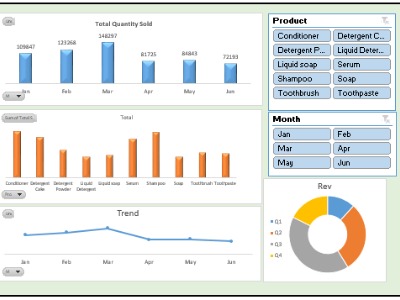
Creating professional charts and graphs, choosing the right chart type, conditional formatting, formatting dashboards for business, use Interactive reporting techniques, best practices for management dashboards.
Module 6: Project
Working on a complete project including data cleaning & preparation, data analysis, and data visualization.
Who is this course for?
Students & Fresh Graduates
Looking to build job-ready skills and improve employability across domains.
Working Professionals
From Finance, HR, Operations, Sales, Marketing, Supply Chain, and IT who use Excel in day-to-day work.
Business Owners & Entrepreneurs
Who want better control over data, reporting, budgeting, and decision-making.
Aspiring Data Analysts & MIS Executives
Who want a strong foundation before moving into Power BI, SQL, or advanced analytics.
Accountants & Finance Professionals
Handling reports, reconciliations, MIS, and financial analysis.
HR & Recruitment Professionals
Managing employee data, reports, dashboards, and analytics.
Operations & Supply Chain Professionals
Working with large datasets, performance metrics, and operational reports.
Managers & Team Leads
Who want to make data-driven decisions and track KPIs effectively.
Anyone Who Uses Excel at Work
And wants to become faster, smarter, and more confident with data.
What's Included In The Course
- Structured Video Lessons
Step-by-step video modules covering every concept from fundamentals to advanced Excel techniques. - Hands-on Practice Files
Downloadable Excel files to practice alongside each lesson and reinforce learning through real examples. - Practical Assignments & Exercises
Topic-wise exercises to strengthen concepts and improve problem-solving skills. - 365 Days of Full Course Access
Learn at your own pace with unlimited access to all course materials. - Certificate of Completion
Receive an industry-recognized certificate from Introtallent upon successful course completion. - Career-Oriented Learning Approach
Designed to build practical skills required for real jobs, not just theoretical knowledge. - Support & Guidance
Access to learner support for resolving doubts and clarifying concepts.

How The Course BenEfits You

Complete flexibility to learn at your convenience

Certificate of Completion from Introtallent upon successful course completion.

Credibility & career advancement opportunities